
Alerts
Get emails when a location goes offline or a camera fails, when chosen events happen, or when a live counter goes above or below a value.
CountVue Portal has three kinds of alerts:
| Kind | Sent when | Set up in |
|---|---|---|
| Health alerts | A location goes offline, a camera fails, analytics is switched off | Alerts page |
| Event alerts | A camera records a chosen event, for example a crossing in direction 2 or a dwell | Camera's Webhooks & alerts panel |
| Counter alerts | A live counter is more or less than a value, for example occupancy over 50 | Report menu Alerts… on a dashboard |
Alerts are for CountVue Live locations. Setting them up needs the Alerts permission.
Health alerts
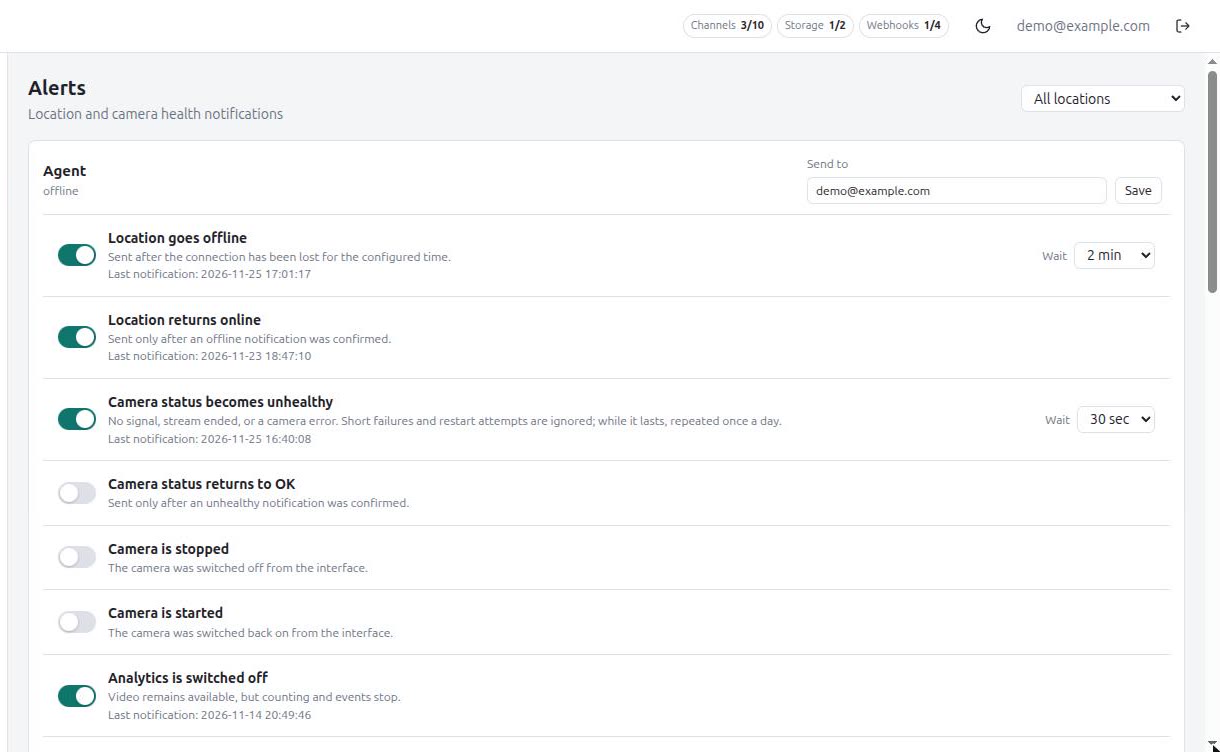
The Alerts page lists your locations. For each location, set Send to (email addresses) and press Save, then switch on the notifications you want and choose how long to Wait before sending:
| Notification | Sent |
|---|---|
| Location goes offline | After the connection has been lost for the time you choose (30 s to 10 min) |
| Location returns online | Only after an offline notification was sent |
| Camera status becomes unhealthy | No signal, stream ended or a camera error that lasts the time you choose. Short failures and restarts are ignored; while it lasts, it is repeated once a day |
| Camera status returns to OK | Only after an unhealthy notification was sent |
| Camera is stopped / started | The camera was switched off or on from the interface |
| Analytics is switched off / on | Video stays available, but counting and events stop / resume |
Event alerts
Event alerts mail you when a camera records an event that matches. Open the location page, choose Webhooks & alerts on the camera, and under Email alerts press Add alert:
- Event: any event, line crossed (direction 1, 2 or both), zone joined or left, dwell, crowd, motion, speed, camera obstructed.
- Line / zone: any, or one of the camera's lines and zones.
- Objects: any object, or people, vehicles, bikes, faces.
- Emails: where to send it.
- Attach the snapshot: adds the event's picture with the line or zone and the object marked (or the camera's current picture when the event has none).
- Not more often than: at most one alert per this time, so a busy door does not flood your inbox.
The camera needs a paid channel. Each event is checked on the location's computer as it happens.
Counter alerts
A live counter on a dashboard (current crossings, occupancy, daily occupancy, queue) can raise an alert when its number is More than or Less than a value. Choose Alerts… in the report's menu and add one or more:
- the condition and the number,
- Email or Webhook delivery and the address,
- At most once per a time you choose.
The location's computer works the counter out every few seconds, even when no dashboard is open. If several alerts hold, the highest more than wins, else the lowest less than. When the location is offline, alerts wait and are sent, marked as delayed, when it reconnects; nothing is sent twice.
A counter alert works at one location, so all cameras of the counter must be at the same location. The location needs a recent version of CountVue Live.
Email delivery
Alerts come from CountVue's address. If they do not arrive, check the spam folder and add the sender to your contacts.
Updated · View as Markdown · Something missing? Ask us