
Events
Search single events of all cameras in CountVue Portal, filter them, open their snapshots and recordings.
The Events page searches the single events of your cameras: every crossing, zone event, dwell, crowd, speed and camera event, with its time, line or zone, object, direction or speed.
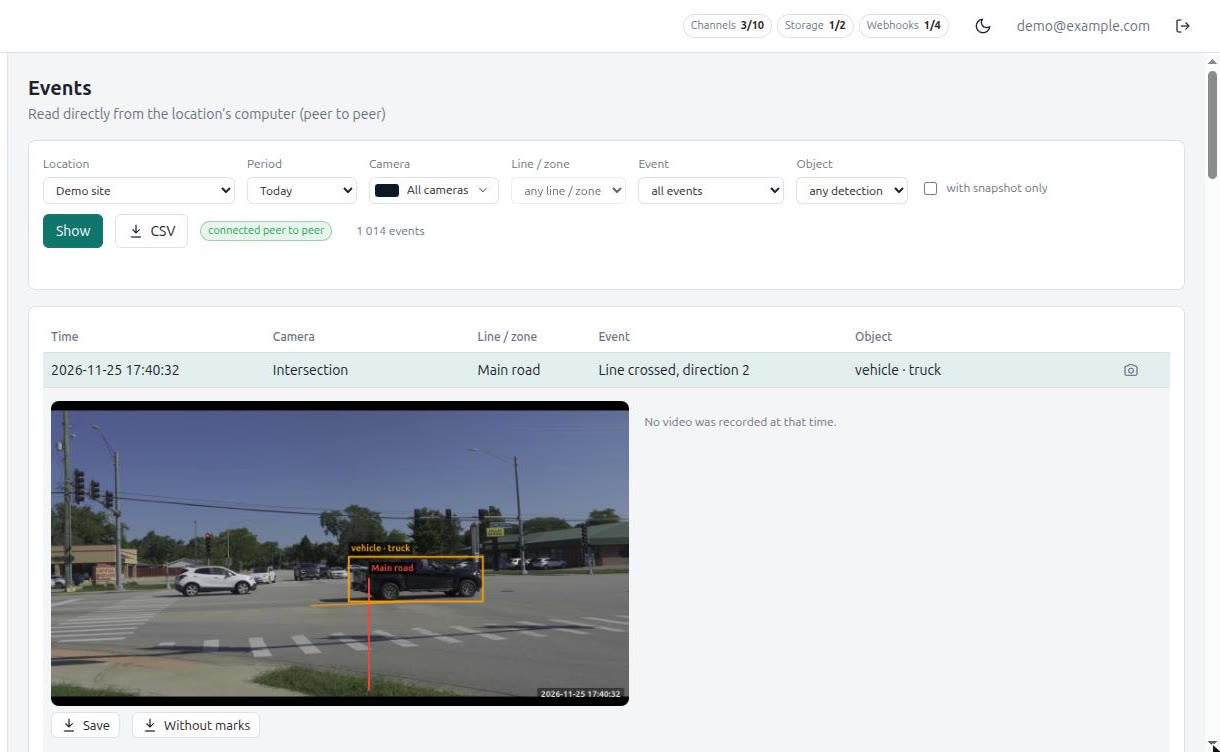
- Choose a Location, then filter by Period, Camera, Line / zone, Event and Object, and tick with snapshot only if you need pictures. Press Show.
- Load more loads older events. CSV downloads the events found (time, camera, line or zone, event, object, class, gender, age, speed), up to 50,000 events.
- Open an event to see its snapshot with the line or zone and the object marked, and Play video around the event (±10 s) when the camera was recording.
- Save downloads the picture with the marks, Without marks as it was taken.
Events are kept on the location's computer; the Portal reads them from there, over a direct encrypted connection, when you search. So the location must be online to search its events and open snapshots. Counts and reports do not need it: they are in the Portal.
Events of a camera without a paid channel are not kept, except the history from while it was paid. Seeing snapshots and recordings needs the Snapshots and recordings permission.
Updated · View as Markdown · Something missing? Ask us