
Set up and run the analysis
Try lines, zones and presets on the video for free, then analyze all files, pause, resume, re-run and follow the progress.
A Survey channel is either in setup (you are trying settings out on the video) or in an analysis (the files are being counted for real).
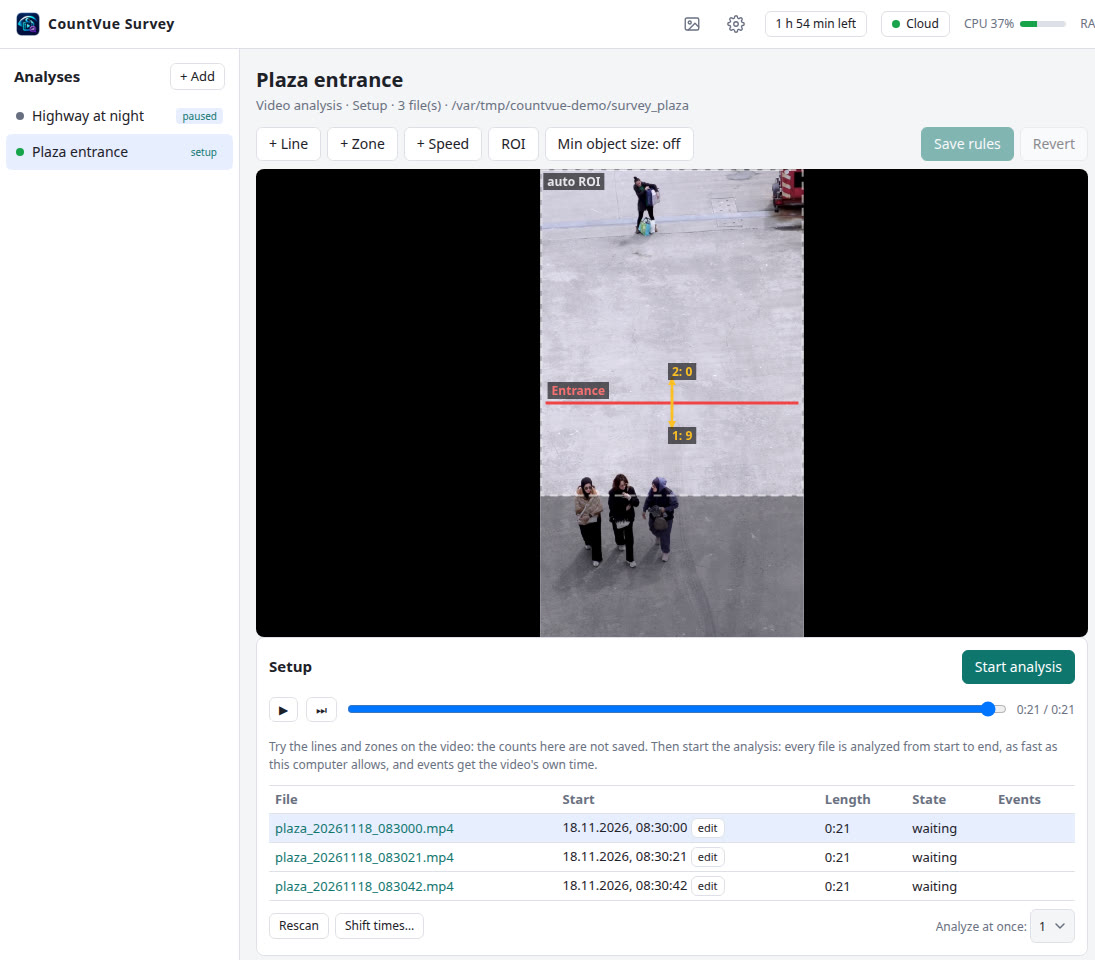
Setup: try it on the video
In setup the selected file plays like in a video player, at normal speed. Use the player controls to play, pause, step, seek and open another file of the folder.
- Choose the preset and mode in Settings → Analysis.
- Draw lines, zones and speed lines and press Save rules.
- Watch the boxes and the trial counts while the video plays, and adjust until the counts match what you see.
Trial counts are not saved and start again from time to time (also when you open another file or seek). Setup is free and uses no hours. To get results, run the analysis.
Check a few minutes at the busiest time of the recording and one at night or in bad weather, if the survey covers them. Count by hand for a minute and compare.
Run the analysis
Press Start analysis. CountVue shows how many files will be analyzed, the hours they need and the hours left, and asks you to confirm.
The files are then analyzed from start to end, one after another, as fast as the computer allows, without showing the video. Depending on the computer, the preset and the mode, this is often faster than real time. The header shows the progress of the current file and of the whole analysis.
| Status | Meaning |
|---|---|
| Waiting in the queue | Other channels are analyzing; this one is next |
| Analyzing | Files are being analyzed |
| Paused | You paused it |
| Waiting for start times | The next file has no start time |
| Out of hours | The next file needs more hours than are left. It goes on by itself once you add hours |
| Paused: not licensed | The computer is not connected to the Portal |
| Done | All files are analyzed |
| Done, watching the folder for new files | All files are done and the folder is watched |
Whole files only
A file's events, snapshots, heatmaps and occupancy are saved only when the whole file is analyzed. If the analysis stops in the middle of a file (you pause, the computer restarts, the app is closed), that file is analyzed again from its start next time and is not charged twice. Finished files keep their results.
Pause, resume, change settings
- Pause stops the analysis. The file in progress is not saved; Resume analyzes it again from its start.
- Back to setup lets you change lines, zones or settings. The results of the last analysis stay until you start a new one.
- Start analysis again replaces the results of the previous analysis (events, counters, snapshots) with new ones.
Several channels at once
All Survey channels share one queue. By default one channel analyzes at a time; a powerful computer can analyze several. Set Analyze at once under the file list.
Snapshots
Event snapshots work in Survey too: choose the event types in the channel's Settings → Snapshots. They are taken from the video during the analysis.
Updated · View as Markdown · Something missing? Ask us